
Saving a video for offline viewing is useful when you are travelling, teaching, or working on a slow connection. There are several ways to download videos from websites on Windows, from a simple right-click to a dedicated video downloader. Before any of them, though, comes one rule: only download videos you are allowed to keep. This guide covers the legal side in plain terms, the methods that work, and how to choose a format and quality that suits you.
First: what you are allowed to download
This is not legal advice, but a few principles apply almost everywhere:
- Your own videos are always fine to download.
- Openly licensed videos, such as those under Creative Commons, can usually be downloaded and reused under the licence terms. YouTube explains its licence types, including Creative Commons.
- Videos with a download button offered by the site are meant to be downloaded.
- Everything else depends on the site’s terms and your country’s copyright law. Many platforms, including YouTube in its Terms of Service, restrict downloading except where they provide a way to do it.
Streams protected with DRM, such as paid film and TV services, are designed not to be downloaded outside their own apps, and trying to get around that protection is not something any legitimate tool should help with.
Method 1: Use the site’s own download option
Many sites that host lectures, conference talks, stock footage or social media clips offer a download button or an offline mode. It gives you the best-quality file with no risk of breaking the rules, so always look for it first. The button is often hidden in a “Share”, “More” or three-dot menu under the player rather than on the video itself.
Method 2: Right-click and “Save video as”
When a page plays a plain video file, the browser often lets you save it directly. Right-click the video and choose Save video as. If you only see a custom menu, the site is using a streaming player, and this method will not work.
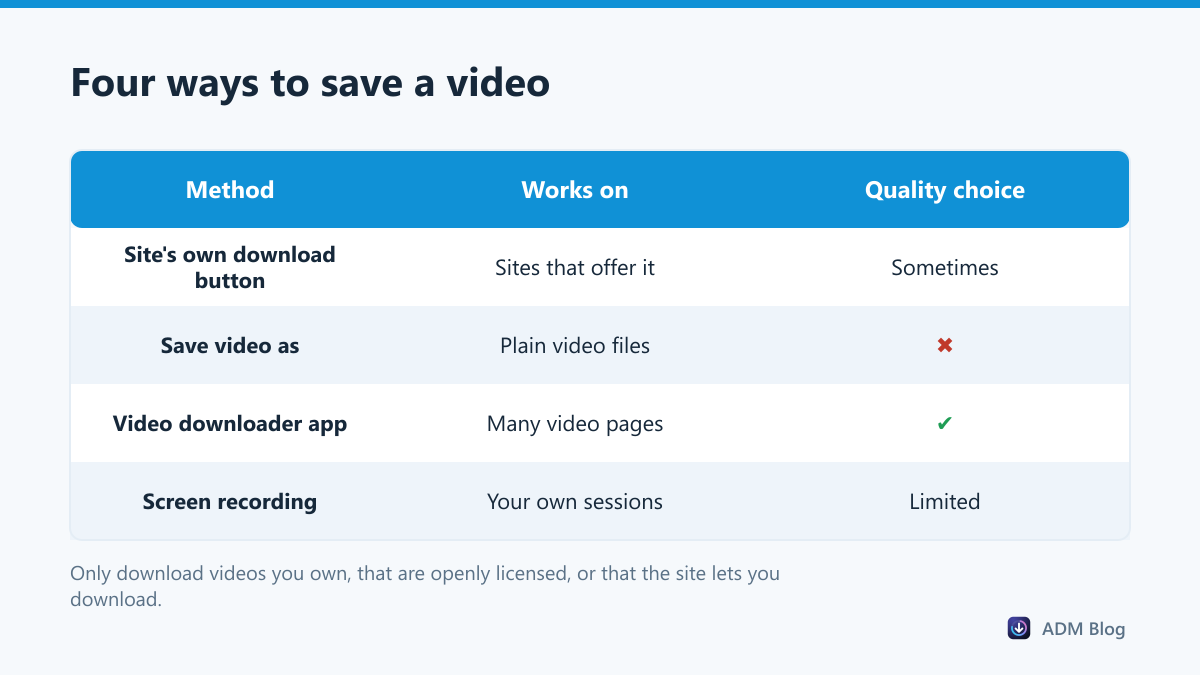
Method 3: Use a video downloader
Most modern sites do not play one video file. They stream the video in many small pieces, often with audio and video separate, which is why “Save video as” is missing. A video downloader understands these formats, fetches the pieces and joins them into a normal file. Many tools, including Advanced Download Manager, build on the open-source yt-dlp project to support a wide range of sites.
With ADM’s browser add-on installed, right-click on a video page and choose Download Video with ADM. The desktop app then asks which format you want.
Video sites change their players often, and a downloader that worked last month can suddenly fail on the same site. That is normal, not a sign that something is broken on your PC. Keep your tool up to date, because fixes for site changes arrive through updates. If a download still fails, check that the video plays in your browser without signing in, since private or members-only videos usually cannot be fetched from outside the page.
Method 4: Record the screen
For a live session you took part in, or a presentation you gave, recording the screen can be the simplest option. The Snipping Tool in Windows 11 can record a part of your screen. The quality is limited to what you see, so use it as a last resort.
Choosing format and quality
| Option | Good for | File size |
|---|---|---|
| Best quality (MP4) | Big screens and editing | Largest |
| 1080p (MP4) | Laptops and TVs | Large |
| 720p (MP4) | Phones and tablets | Medium |
| 480p (MP4) | Saving space, slow connections | Small |
| Audio only (M4A or MP3) | Lectures, podcasts, music you own | Smallest |
These are the choices ADM offers when you download a video. Some of them, such as 1080p and MP3, need the free FFmpeg component to merge or convert the streams, which the app can set up for you. Long, high-quality videos can be several gigabytes; our large file checklist helps them arrive in one piece.
Stay safe when you download videos from websites
- Avoid “online video converter” sites covered in pop-ups; they are a common source of malware and fake download buttons.
- Be suspicious of any video that downloads as an .exe file. Real videos end in .mp4, .webm, .mkv or similar.
- Scan anything unusual before you open it. Our guide on whether a file is safe to download walks through the checks.
Frequently asked questions
Why is there no “Save video as” option?
The site uses a streaming player that sends the video in pieces. You need the site’s download option or a video downloader instead.
Why does my downloaded video have no sound?
Some sites send video and audio separately. A downloader has to merge them, which usually requires FFmpeg. Choose a format that includes audio, or install FFmpeg.
Can I download a whole playlist?
Some tools can. ADM downloads single videos: it ignores playlist parameters in a link and saves only the video you picked.
Is it legal to download videos for personal use?
It depends on the site’s terms and local law. Your own videos, openly licensed videos and videos with an official download button are the safe choices.
The best way to download videos from websites is the one the site offers itself; after that, “Save video as” and a trusted video downloader cover most cases. Stick to videos you have the right to keep, pick a sensible quality, and you can download videos from websites safely on Windows.