
You download a file, and instead of the finished item Chrome shows a red line: Failed – Virus scan failed. It is an alarming message, but it rarely means a virus was found. In most cases it means the scan could not be completed at all. Knowing which of the two happened decides what you should do next, and this guide walks through both.
What virus scan failed really means
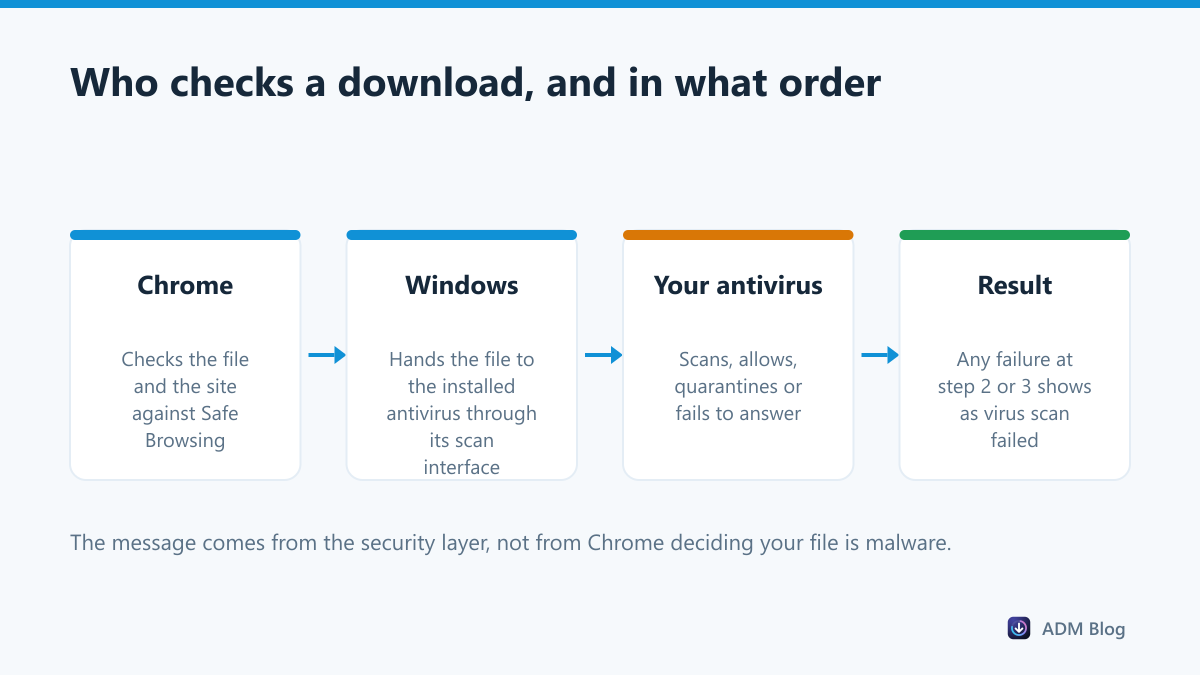
On Windows, your browser does not inspect downloads by itself. It passes each finished file to the operating system, which hands it to whatever antivirus is installed. If that handover goes wrong, or the scanner never answers, the browser gets no verdict and refuses the file. Microsoft describes this handover in its Attachment Manager documentation.
So there are two very different situations behind the same words:
- Something was detected. Your antivirus quarantined the file. You will usually find a matching entry in its history.
- Nothing was detected, the scan just failed. Two security tools fighting over the same file, a broken scanner service, a huge file, or an archive the scanner cannot read.
Step 1: find out who blocked it
Open your security software and look at its recent detections or quarantine list.
| What you find | What it means | What to do |
|---|---|---|
| A detection with a malware name | The file really was flagged | Delete it, find another source |
| A generic or heuristic detection | Possibly a false alarm | Check the file on a second service first |
| Nothing at all | The scan never completed | Fix the scanning setup, then retry |
| Two antivirus programs installed | They are blocking each other | Remove one of them |
Step 2: if nothing was detected
These are the fixes that solve a failed scan, in the order worth trying:
- Restart the PC. A stalled scanner service is the single most common cause, and a restart clears it.
- Update your antivirus, then try the download again. Outdated engines fail more often on large files.
- Remove the second security tool. Windows is designed for one real-time scanner. Two of them produce exactly this error.
- Save to a normal folder. Network drives, external media and protected folders can break the handover. Our guide to changing the download location shows where the setting is.
- Try the file in another browser. If Edge or Firefox saves it without complaint, the problem is Chrome’s profile, not your security software.
Step 3: getting a file you trust
If you are sure of the source, for example an installer from the developer’s own site, verify it before you insist:
- Check the download page is the official one and uses HTTPS.
- Upload the file to a multi-engine scanner, or scan it after saving.
- Compare the checksum with the published value when there is one.
Our checklist for deciding whether a file is safe to download covers all three, and Chrome blocking downloads explains how to keep a single blocked file without switching Safe Browsing off.
What you should not do is disable your antivirus, download, and forget to turn it back on. One allowed file is a decision; an unprotected PC is a habit.
Why virus scan failed hits some files and not others
People often notice the error on one particular file while everything else downloads normally. That pattern has a few usual explanations:
- Size. Scanners have limits, and a 6 GB archive can exceed what the engine will unpack in the time it allows itself.
- Archives inside archives. A zip containing another zip containing an installer makes a scanner work much harder, and some give up instead of answering.
- Password-protected archives. The scanner cannot look inside, and some products treat that as a failed scan rather than a clean result.
- Rare files. A brand-new release that no reputation service has seen yet gets the most suspicion, which is also why Chrome warns about uncommon downloads.
- File type. Executables, scripts and installers go through more checks than a PDF or an image.
None of those means the file is dangerous. They mean the check could not finish, which is exactly why the next step is your antivirus log rather than a different download link.
When a download manager helps
A download manager saves the file itself, so the browser’s handover step is not involved at all. The file still lands on a PC with real-time protection, and Windows still scans it when you open it, so nothing is bypassed. What changes is that a failed scan no longer throws away the whole transfer. Advanced Download Manager keeps each download in its list with a status you can retry, which matters most on the big installers and disk images covered in our large file guide.
Frequently asked questions
Is virus scan failed the same as virus detected?
No. “Virus detected” means something was found. “Virus scan failed” usually means no verdict arrived at all. Check your antivirus history to tell them apart.
Why does it only happen with large files?
Many scanners skip or time out on very large archives. That timeout reaches the browser as a failed scan.
Can I turn off the scan in Windows?
There is a policy that disables the attachment scan, but turning it off removes a safety layer for every file you download, not just this one. Fix the scanner instead.
Does it happen in Edge and Firefox too?
Yes. The wording differs, but all Windows browsers rely on the same scanning interface.
Treat virus scan failed as a question, not a verdict: was something found, or did the check simply break? Answer that in your antivirus log, apply the matching fix, and the file downloads normally the next time.