
You open your Downloads folder expecting a new installer and find something ending in .crdownload instead. A crdownload file is not a broken file type and it is not malware: it is Chrome’s way of saying “this download is still in progress”. Understanding what it holds explains why double-clicking it does nothing, and what you can do to get the real file.
What a crdownload file actually is
When Chrome or Microsoft Edge starts a download, it creates a placeholder with the final name plus the .crdownload extension and writes the incoming bytes into it. The moment the last byte arrives, the browser renames it to the real name, for example from setup.exe.crdownload to setup.exe. So the file you are looking at is a partial copy: the first half of a program, the first minutes of a video, the first pages of an archive.
Firefox does the same thing with a different extension, .part, and download managers use their own temporary names. They all work on the same principle.
| Extension | Created by | Means |
|---|---|---|
| .crdownload | Chrome, Edge, Brave, Opera | Download in progress or interrupted |
| .part | Firefox | Download in progress or interrupted |
| .tmp | Many programs | Temporary working file |
| .download | Safari | Download in progress |
Why the file is still there
A leftover usually means one of these:
- The download is still running. Check the downloads bar before you touch anything.
- The connection dropped. The browser kept what it had. This is the same situation as the Chrome download failed network error.
- You closed the browser mid-download. Chrome can often continue, but only if the server allows it.
- Your antivirus is holding the file while it scans, or it blocked it outright.
- The drive filled up before the last byte arrived.
Can you open or rename a crdownload file?
Renaming it by removing the extension is the first thing most people try. It almost never helps, because the content is incomplete rather than mislabelled. What you get depends on the format:
- Programs, archives, documents: useless. An installer missing its last megabyte will not run, and a zip without its index cannot be opened.
- Video and audio: sometimes partly playable. VLC can often play the part of an MP4 that arrived, though seeking will be broken.
- Images: you may see the top portion of a photo and grey below it.
Renaming also destroys your chance to resume: the browser no longer recognises the temporary file and starts from zero.
How to finish the download instead
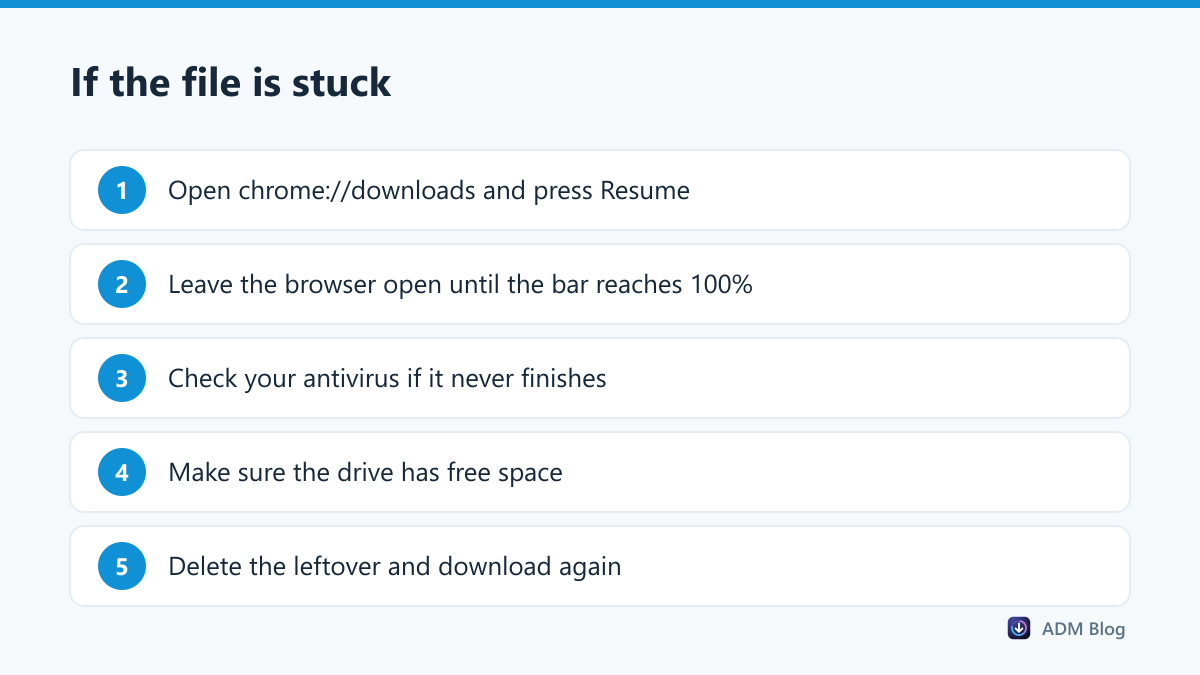
- Press Ctrl + J to open
chrome://downloads. - Find the entry and click Resume. If only Retry is offered, the download has to start again.
- Keep the browser open until the progress bar completes. Closing it mid-transfer is what creates most leftovers.
Google’s help page on downloads shows the same Pause and Resume controls in the download bubble. Our guide to pausing and resuming downloads explains why Resume is sometimes greyed out: the server has to support partial requests.
How to tell whether it is still downloading
Before you decide anything, find out whether the transfer is alive. Three checks settle it in a few seconds:
- Watch the file size. Open the folder in Details view, press F5 a couple of times and see whether the size grows. A growing file is a running download.
- Look at the downloads page. An active item shows a speed and a remaining time; a dead one shows Resume, Retry or an error.
- Check the date modified column. If it has not changed for several minutes while the browser claims to be downloading, the transfer has stalled.
A stalled transfer that never moves again is usually the browser waiting on a server that has stopped answering. Cancel it and start again rather than waiting it out.
When it is safe to delete
If the download already finished successfully, or you no longer want the file, the leftover is safe to delete. Nothing on your system depends on it. Before deleting, make sure the download really is dead: check the downloads page first, because deleting the temporary file cancels any chance of resuming.
Large leftovers are worth hunting down. A few interrupted 4 GB downloads can quietly occupy a lot of space; sort your folder by size, as described in our Windows downloads folder guide.
Avoiding them in the first place
Leftovers appear when a single long connection is interrupted. A download manager works differently: it tracks every part of the file, resumes after a drop and retries on its own. Advanced Download Manager downloads each file in parallel parts and keeps a status for every item, so an interrupted transfer stays resumable instead of becoming an orphan in your Downloads folder. For multi-gigabyte files, see our large file checklist.
Frequently asked questions
Is a crdownload file a virus?
No. It is created by your own browser. The content inside is whatever you were downloading, so the usual rule applies: judge the source, not the extension. Our checklist for deciding whether a file is safe to download covers the checks.
How do I convert a crdownload file to MP4?
There is nothing to convert. If the download finished, the browser renames it to .mp4 automatically. If it did not finish, no converter can invent the missing data; resume or download it again.
Why does the file stay at 100% and never rename?
Usually an antivirus scan is still running, or the security software blocked the file at the last moment. Check its history, and see our guide to Chrome blocking downloads.
Can I move a crdownload file to another folder?
Not while it is downloading. Moving or renaming it breaks the link to the browser and the transfer fails.
A crdownload file is simply an unfinished download, not a damaged one. Resume it if you can, delete it if you cannot, and use a tool that resumes reliably if you keep seeing them. Then the only crdownload file you ever notice is the one that disappears a second later.