
When a Firefox download keeps failing, the error message rarely says why. You get a red entry in the downloads panel, sometimes a leftover .part file, and no explanation. The useful news is that the causes fall into a short list, and one two-minute test separates them, so you do not have to work through every suggestion on the internet.
The test that narrows it down
Before changing any setting, try the same download in a new Firefox profile. Type about:profiles in the address bar, create a profile, launch it, and download the file there. A fresh profile has no extensions, no custom save folder and no corrupted preferences.
- Works in the new profile: the fault is in your normal profile — an extension, a setting or a damaged file.
- Fails in both: the fault is outside Firefox — the folder, your security software, the network or the server.
That single answer removes half the list below, which is why it is worth the two minutes.
Eight reasons a Firefox download keeps failing
1. The save folder no longer exists
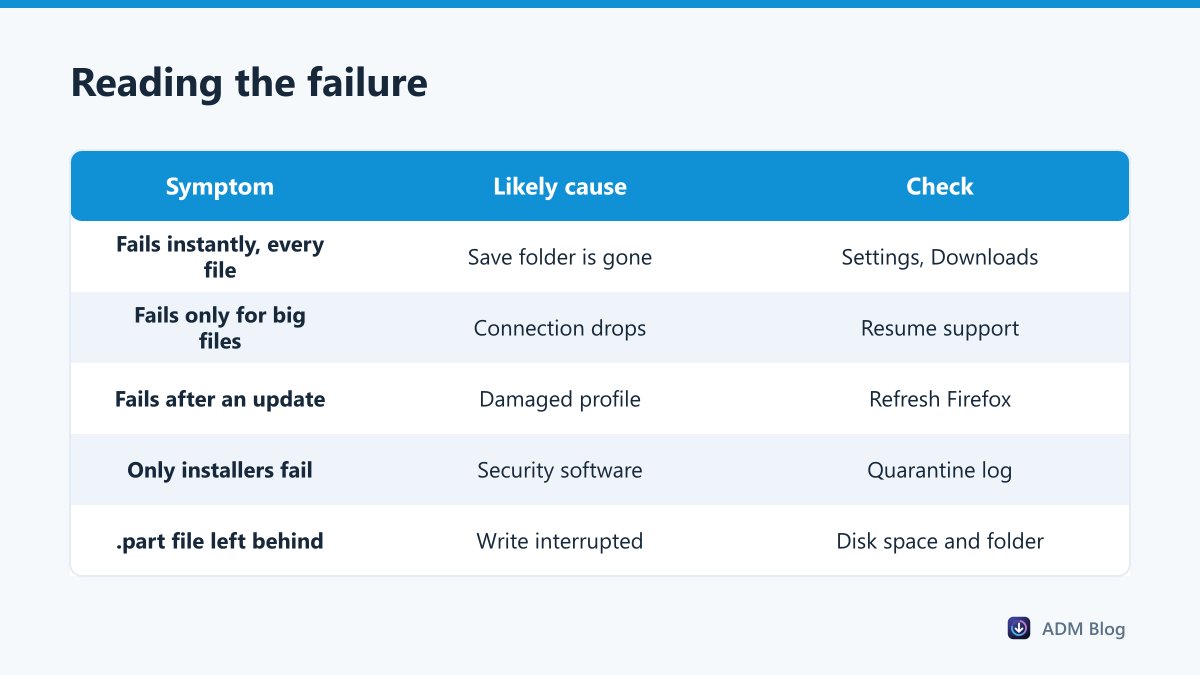
Firefox keeps writing to the last folder you chose. If that was a USB stick, an external disk or a folder you later deleted, every download fails at once. Open Settings, then General, and look at the Downloads section. Mozilla’s guide to finding and managing downloaded files shows where that setting lives; our own guide to changing the download location covers it alongside the other browsers.
2. Windows is refusing the write
If the folder exists but is read-only, protected by ransomware protection or on write-locked media, the download dies at the moment it tries to save. That failure belongs to Windows rather than to Firefox, and it is covered in our guide to the insufficient permissions error.
3. A leftover .part file is in the way
Firefox writes to a .part file while a transfer runs and renames it at the end. When an old .part file with the same name is still sitting in the folder, or when the rename is blocked, the download reports failure even though the data arrived. Our explainer on the Firefox part file covers when it is safe to delete one.
4. The profile is damaged
A corrupted download history database is a classic cause, and it survives restarts, which makes it look like a permanent fault. If the test above worked in a new profile, use Help, then More troubleshooting information, then Refresh Firefox. That keeps bookmarks, history and passwords while resetting settings and extensions.
5. An extension is intercepting downloads
Download helpers, ad blockers and privacy extensions all sit in the path of a download request. Open a Troubleshoot Mode window from the Help menu, which starts Firefox with extensions disabled, and try again.
6. Security software is aborting the save
Antivirus products scan files as they land and can cancel the write without telling the browser why. Mozilla’s own page on not being able to download or save files lists this among the first things to rule out. Check the product’s quarantine log for an entry at the same time as the failure.
7. The connection is dropping on long transfers
A download that completes for small files and fails for large ones is usually not a browser problem at all. Long single-stream transfers expose brief interruptions that short ones never notice. Our guide to downloading large files goes into what actually helps.
8. The server is refusing or expiring the link
If one site fails and everything else works, the cause is almost certainly at the other end: an expired signed link, a session that timed out, or an outright refusal. A server refusal appears as a forbidden error rather than a generic failure.
Firefox compared with the other browsers
| Behaviour | Firefox | Chrome and Edge |
|---|---|---|
| Temporary file | .part |
.crdownload |
| Reset without losing data | Refresh Firefox | Repair, then Reset |
| Run without extensions | Troubleshoot Mode | InPrivate or Incognito |
| Resume after a drop | Often, if the server allows it | Often, if the server allows it |
| Clean profile for testing | about:profiles |
New browser profile |
The temporary file names differ, but the underlying causes are shared: a missing folder, a refused write, a dropped connection or a server that said no.
Resuming versus starting again
Most of the fixes above stop the failure from happening. The remaining question is what a failure costs you. When the .part file is still in the folder and the server supports partial transfers, Firefox can sometimes continue from where it stopped: open the Library window with Ctrl+Shift+Y and retry the entry there, rather than clicking the original link again, which always starts a fresh copy. When the server does not support it, every tool starts again from zero, and one bad minute on the connection undoes an hour of transfer.
Advanced Download Manager does not resume a failed transfer part-way either — a retry starts the file again — so the browser’s own resume is the first thing to try. Where ADM helps is speed and isolation: it keeps its own save folder, so a broken folder setting in the browser does not stop your transfers, and on servers that allow it, it splits a file across several connections (up to 32), which can make a long download much shorter. It cannot make a server hand over a file it is refusing, and nothing should. Pausing a transfer on purpose is a separate topic, covered in our guide to pausing and resuming downloads.
Frequently asked questions
Why does my Firefox download keep failing at the same percentage?
A repeatable stopping point usually means the server is cutting the connection at a size or time limit, or an antivirus scan triggers at that point. Try the same file in another browser: if it stops in the same place, the cause is not Firefox.
Is it safe to delete a .part file?
Yes, once you have given up on resuming that download. It holds only the partial data, so deleting it ends any chance of continuing, but it also clears the way for a clean retry.
Does Refresh Firefox delete my passwords?
No. It keeps bookmarks, history, passwords and cookies, and resets extensions, themes and settings.
Why does the same file download fine in Chrome?
Most often because the two browsers point at different save folders, or because an extension exists in only one of them. Compare the download folder in each before assuming Firefox is at fault.
A Firefox download keeps failing for a small number of reasons, and the new-profile test tells you within two minutes whether to look inside the browser or outside it. Check the save folder first, the profile second, and leave the network and the server for last.